
Knowledge Base
How to conduct an indoor cellular site survey
When evaluating whether a cellular signal booster or distributed antenna system (DAS) is the right solution for your building or home, the first step is understanding exactly where the signal problem exists and how bad it really is.
A methodical site survey gives you objective data instead of vague impressions like “the signal is terrible in the back office.” This guide walks you through how to conduct one properly.
What is an indoor cellular site survey?
An indoor cellular site survey is the systematic collection of signal measurements at predefined locations throughout a building. The goal is to establish a baseline of current signal conditions that can later be used to evaluate a booster system, position antennas, or identify dead zones that need the most attention.
The two primary measurements you’ll record are RSRP (Reference Signal Received Power) and RSRQ (Reference Signal Received Quality). Together, these two values paint a complete picture of the cellular environment at each location. We’ll discuss those below; first, let’s introduce the tools you’ll use to complete your survey:
Tools: Measuring signal on Android and iPhone
Standard signal bar indicators on phones are not suitable for a site survey. They are heavily smoothed, carrier-adjusted, and too coarse to reveal meaningful differences between locations. You need access to raw data values.
Android
There are several Android apps in the Google Play store you can use. We recommend Network Cell Info Lite  by M2Catalyst, which displays RSRP, RSRQ, SINR, band, and serving cell information in real time, updated every second or two, which is sufficient for a manual walk-around survey. Free with optional paid features. Works on most Android devices without root access.
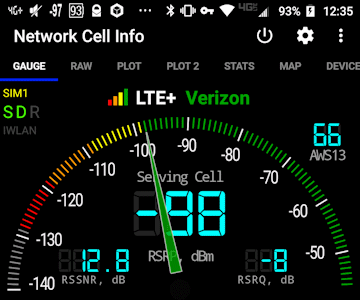

Links to third-party software are provided “as is,” without warranty of any kind, either expressed or implied, and such software is to be used at your own risk. Powerful Signal will not be liable for any damages you may incur in connection with downloading, installing, or using such software.
iPhone: Field Test Mode
iPhones do not expose raw signal values through a consumer app, but Apple includes a hidden diagnostic screen called Field Test Mode that reports RSRP and RSRQ directly.
To access Field Test Mode, dial *3001#12345#* and press the Call button:
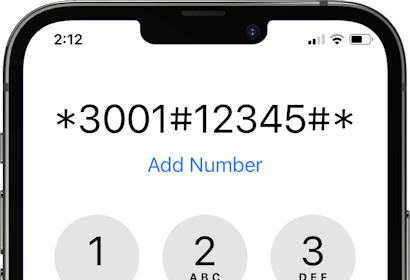
This will put your iPhone into Field Test Mode.
If your phone is running iOS 18, you should see the FTM Dashboard:
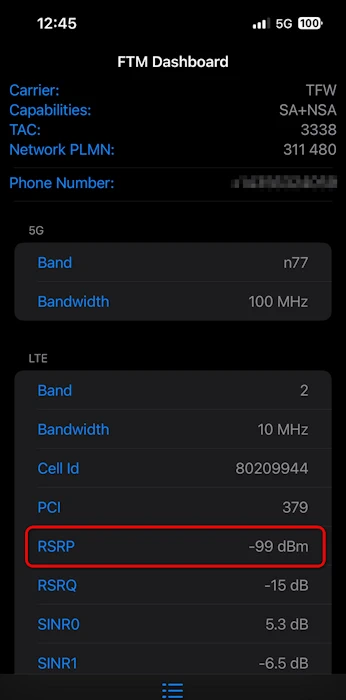
To exit Field Test Mode, swipe up.
Note: Apple is continually changing the layout of the Field Test Mode screen. If your iPhone’s screen doesn’t look like the example above, look through the Field Test Mode menu for Serving Cell Measurements with fields that have negative values labeled rsrp (or rsrp0) and rsrq (or rsrq0).
Understanding RSRP and RSRQ
Signal Power: RSRP
RSRP measures the average power of the signal received from the cell tower, expressed in dBm (decibels relative to one milliwatt). It tells you how much of the tower’s signal is actually reaching your device. Think of it as the volume of a radio station’s broadcast at your location.
The higher the number—less negative, closer to zero—the stronger the signal. For example, a reading of −85 dBm is much better than −105 dBm.
(Learn more about signal strength and RSRP.)
Signal quality: RSRQ
RSRQ measures the quality of the received signal, including interference from neighboring cells and background noise. It’s expressed in dB (decibels) and is always a negative number. The less negative (closer to zero) the number is, the clearer the signal.
A location can have strong RSRP (the tower is loud) but poor RSRQ (the signal is full of interference or noise), much like receiving a loud but heavily distorted radio station. Both values matter, and a good site survey captures both.
Selecting your scan points
Before you start, take at least one measurement directly outside the building—on a rooftop if accessible, or at the main entrance. This establishes how strong the signal is before any building attenuation occurs, gives you a baseline to compare indoor readings against, and lets you know how much signal a cell signal booster will have to work with.
Scan point selection should be driven by the practical needs of the building’s occupants. Rather than taking measurements uniformly across every square foot, focus your survey on locations where reliable cellular service matters most:
- Workstations and desks where employees make voice calls or rely on cellular data
- Conference rooms and huddle spaces where wireless connectivity supports meetings
- Lobbies and reception areas where visitors and staff frequently make calls
- Warehouses, server rooms, or basements that are known problem areas
- Stairwells and elevator banks that connect floors
- Exterior-facing perimeter walls vs. interior core spaces, since signal typically degrades as you move away from windows and exterior walls
In a home, focus on areas where you most need cellular signal: home office, living room, family or TV room, kitchen, master bedroom, basement, etc.
On a building floor plan, mark each scan point with a number or letter identifier. This label will tie directly to your data log, so be consistent.
Aim for enough points to give meaningful coverage without creating an unmanageable amount of data. For most office floors, one measurement point per 500–1,000 square feet is a reasonable starting density, with additional points added for any areas known to be problematic.
Account for signal fluctuations
Cellular signal levels are not static. They fluctuate continuously due to multipath interference (signal reflections off walls, furniture, and people), changes in network load on the tower, and the physical movement of people or objects nearby. A reading taken at the same spot two seconds apart can differ by 3–5 dB or more.
For this reason, do not record a single instantaneous reading at each scan point. Instead, stand still at the scan point for 15–20 seconds, observe the values cycling on screen, and note the approximate midpoint or average of what you see. Most Android apps display a continuously updating value; watch it through several cycles and mentally average the range. Recording the average RSRP and average RSRQ at each point is entirely appropriate for a site survey of this kind and produces results accurate enough to make sound equipment and antenna-placement decisions.
One carrier per device: Plan for three phones
This is an important limitation that is easy to overlook. A phone only measures and reports signal data for its own carrier’s network. A Verizon phone will give you Verizon RSRP and RSRQ readings; it will not show any data for AT&T or T-Mobile.
The three major US carriers—Verizon, AT&T, and T-Mobile—each operate on different frequencies and tower infrastructures. In a given building, one carrier may have strong signal in areas where another is nearly unusable. If you intend to improve service for all three carriers (which is the case in any multi-tenant office building, retail space, or public venue), you need to conduct the survey three times, once per carrier, ideally using a device native to each network.
When logging your data, record the carrier alongside each reading so the datasets remain clearly separated. If resources are limited, prioritize the carrier that is most widely used by the building’s occupants and treat the others as secondary surveys.
Recording your data: Download our spreadsheet
A spreadsheet is an effective format for capturing and organizing site survey data. Our downloadable file provides a practical starting structure.

 Download our site survey file in Excel (XLSX) format
 Download our site survey file in comma-separated values (CSV) format
Columns:
- ScanPointID: The alphanumeric label that corresponds to the marked point on your floor plan (e.g., F2-07 for Floor 2, Point 7).
- Floor: Useful when surveying multi-story buildings where vertical position has a significant effect on signal.
- Location Description: A plain-language description such as “South conference room, interior wall” to help interpret the data without referring back to the floor plan.
- Carrier: Verizon, AT&T, or T-Mobile.
- Device Model: Records the specific phone used, since different antenna designs affect readings.
- Date / Time: Signal conditions can vary by time of day as network load changes. Recording both lets you identify whether repeated measurements at different times would be valuable.
- RSRP_avg / RSRQ_avg: The averaged values from your 15–20 second observation window.
- SINR_avg: Signal-to-Interference-plus-Noise Ratio, a third quality metric available in most Android apps. A positive value in dB is generally acceptable; values above 20 dB are excellent.
- Band/Frequency: The LTE or 5G band in use (e.g., Band 12, Band 71, n41). This matters because low-band frequencies penetrate buildings better than high-band frequencies, and a booster must support the correct bands.
- Network Type: LTE or 5G NR (and whether it is Sub-6 or mmWave 5G, if applicable).
- Notes: Anything contextually relevant: proximity to a window, obstructions like elevator shafts or mechanical rooms, unusual construction materials (metal-framed walls, low-e glass), or a particularly wide swing in readings.
Additional considerations
Building materials matter. Before conducting the survey, note the construction materials in the building. Low-emissivity (low-e) glass, concrete, metal studs, foil-backed insulation, and brick are all known to attenuate cellular signal significantly. Noting these features alongside weak readings helps explain the data and informs antenna placement decisions.
5G vs. LTE. If devices connect to 5G NR at any scan points, record that separately from LTE readings. Sub-6 GHz 5G (such as T-Mobile’s Band n71) behaves similarly to LTE for building penetration purposes, but mmWave 5G (above 24 GHz) barely penetrates walls at all and will almost always fall back to LTE indoors. Most cellular boosters currently available are LTE/5G compatible; some have Band 71 capability. mmWave is a separate consideration.
Time of day. If the survey data are being used as the first step toward a permanent installation, consider taking a second round of readings during peak usage hours (typically mid-morning on a weekday), since tower congestion can degrade RSRQ even when RSRP looks adequate.
Document your floor plan. Export or photograph the marked-up floor plan alongside the CSV file. The data table and the spatial map together tell the full story; either one alone is incomplete.
Final step: Send Powerful Signal your site survey files
We’ll be happy to take a look at your cell signal readings and floor plan, then give you a free custom quote on the right cell signal booster or DAS system for your building.
Email your files to
. We’ll typically get back to you within one business day.
If you have any questions about conducting a site survey, please contact us—we’re glad to help!